← Back to projects
Case study
OpsCore
Collaborative MVP built to digitize the reporting, tracking and resolution of incidents in operational environments.
The project was developed as part of a professional team simulation, including frontend/backend integration, QA feedback, Git branches, pull requests, production deployment and improvements based on real operational flow issues.
Context
The problem
In an operational environment, incidents are not enough to simply report. They need traceability, clear assignment, status tracking and a simple way to understand what is pending, what has been solved and who needs to act.
The main problem was organizing a workflow that can usually be scattered across messages, spreadsheets or manual records, especially when different profiles are involved: operator, supervisor, technician and manager.
Goals
What the MVP needed to solve
The priority was to build a functional tool that supported the full incident flow, from creation to resolution.
Centralized reporting
Allow an operator to register an incident with clear information to start the tracking flow.
Assignment and tracking
Allow supervisors to assign technicians and ensure each role sees relevant information according to permissions.
Operational visibility
Show lists, details, statuses and metrics to understand the progress of incidents inside the system.
Solution
What we built
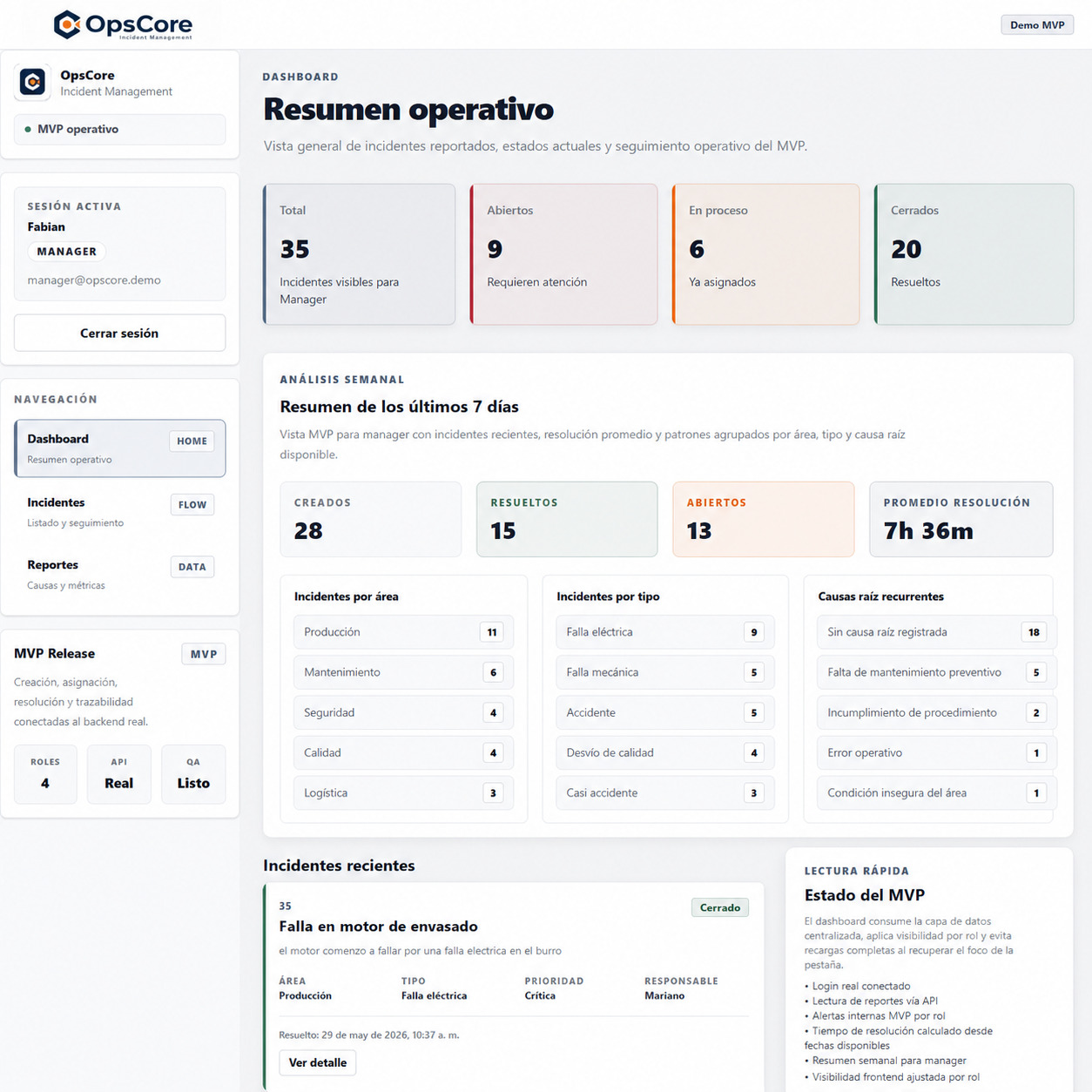
We built a web application with a Next.js frontend, a Django REST API backend and role-based views. The system allows users to create incidents, browse lists, review details, assign technicians, resolve reports and access operational data.
My work focused on the frontend layer: view structure, integration with real endpoints, user session handling, role-based permissions, protected routes, data visualization, QA bug fixes and performance improvements on heavy list views.
Features
Main features
Authentication
Backend-connected login, session persistence and authenticated user reading to render the correct experience.
Role-based views
Interfaces adapted for operator, supervisor, technician and manager, avoiding actions that did not match each profile.
Protected routes
Access control for internal sections to prevent inconsistent navigation when there is no valid session.
Incident management
Creation, listing, detail view, technician assignment, resolution and reading of information related to each incident.
Dashboard and metrics
Operational data visualization to provide context about the general status of reports.
QA fixes
Adjustments on functional bugs, permissions, navigation, time formatting and consistency between views.
Stack
Technologies used
Frontend
Next.jsReactJavaScriptTailwind CSS v4
Integration
REST APIAuthRolesProtected routesPostman
Deployment and teamwork
VercelRenderGitGitHubPull RequestsQA
My role
Main responsibilities
I participated as a Frontend Developer, taking tasks related to integration, view structure and user experience adjustments. The focus was to move the MVP beyond a mockup and make it work with real data, roles and endpoints.
I also worked on navigation improvements, permissions, QA bug fixes, inconsistent flow cleanup and optimization of views that were loading data too heavily.
Technical decisions
Criteria applied during development
Frontend connected to a real backend
We prioritized consuming real endpoints instead of mock data to validate the complete product flow.
Role-segmented experience
I adjusted navigation, buttons and views so each profile could access actions aligned with its responsibilities.
QA-driven fixes
The project was refined from concrete reports, prioritizing bugs that blocked the flow or created confusion.
Heavy list optimization
We worked on slow views to reduce unnecessary requests and improve the experience when navigating data.
Result
Operational MVP with the main flow working
The result was an operational MVP with authentication, role-based views, incident reporting, assignment, tracking, resolution and data visualization. Beyond the technical side, the project helped me work in a more realistic environment: team workflow, QA, branches, PRs, frontend/backend integration and production deployment.
Learnings
What I learned from this project
OpsCore helped me strengthen skills that do not always appear in individual projects: coordinating changes with backend, adapting the frontend to real API responses, working with QA criteria and making decisions for users with different roles.
It also left a clear technical lesson: when a view feels slow, improving styles or loading states is not enough. You need to review the data flow, avoid repeated work and address the real bottleneck.
Links
View project code
I show the repository as a technical reference. I do not include the public demo as the main link because the app currently opens directly into login, and this case study communicates the real MVP scope more clearly.